
Receiving software for warehouses

Every carton photographed. Every customer in the loop.

CartonLedger is receiving software for warehouses that hold goods for other businesses. Log each delivery on your phone, photograph condition and damage at the dock, and let your customers see photos and status in their own portal.

14 days of Growth free · No card · Free plan after · Plans from $59 a month

Receiving for someone else means proving what you received.

When freight is yours, a scuffed box is your call. When it belongs to a customer, a client or a brand, every carton is a question waiting to be asked: Did it arrive? Was it damaged? Which box? Who signed for it? Can you send me a photo?

Most receiving warehouses answer from a spreadsheet, a phone camera roll and a group text. It works, until:

  • the photo of the damaged chaise is on someone's phone who's off today;
  • the customer finds a chipped leg at install, and nobody can show how it arrived;
  • you spend the afternoon answering "did it come in yet?"

And many carriers want concealed damage reported within days of delivery, not weeks.1

1 For example, Old Dominion asks for concealed damage within 5 business days and Estes within five days. Rules vary by carrier; check your carrier's terms.

From the dock to your customer's screen in three steps.

  1. Step

    Receive it.

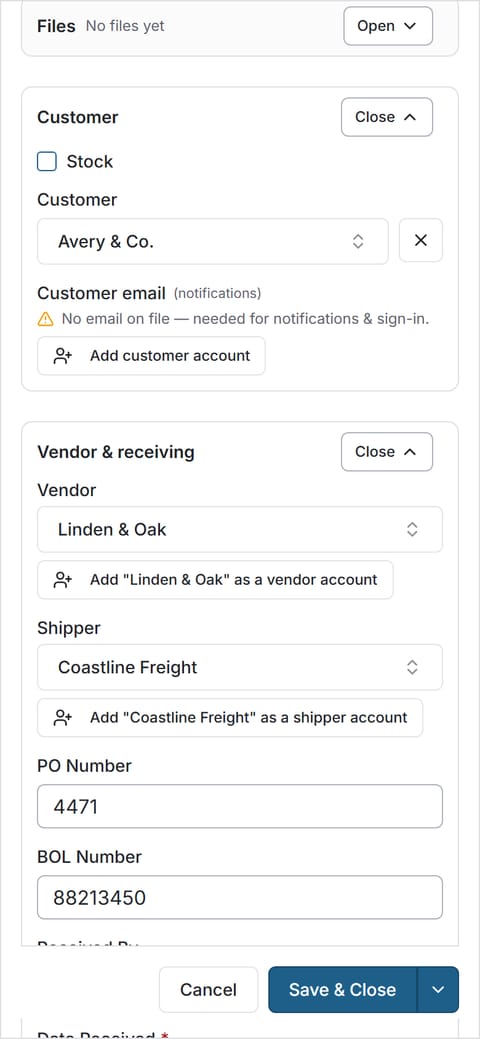
    Open the order on your phone, or start one. Enter the PO, BOL or PRO number, sidemark and carton count, using only the fields you've switched on.

    Order form on a phone with the customer, vendor, shipper, PO and BOL filled in.
  2. Step

    Photograph and check it.

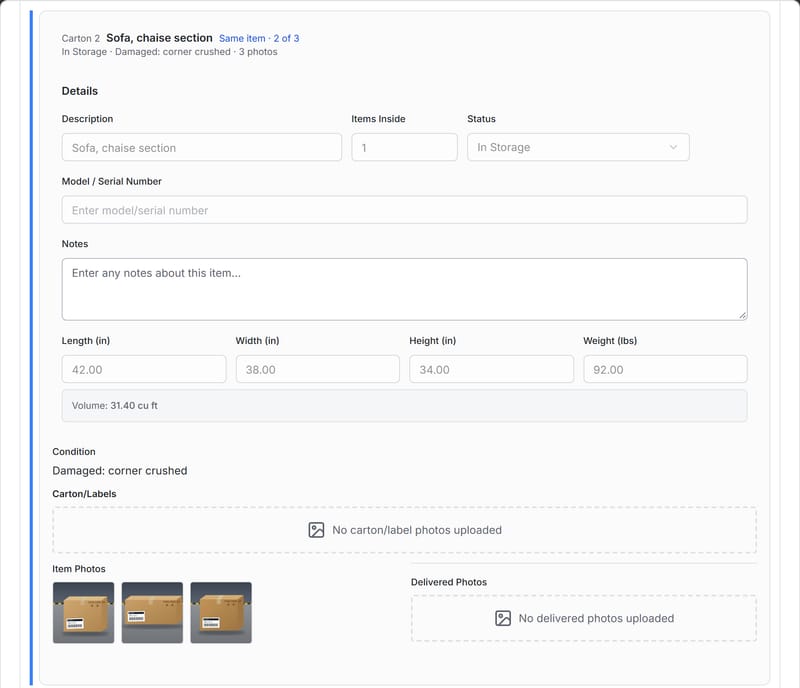
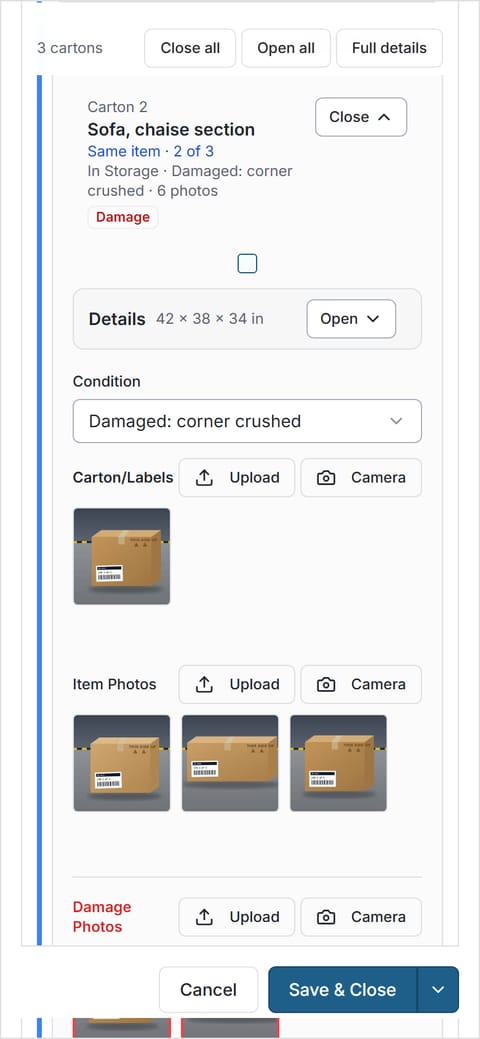
    Take photos of each carton, mark its condition, add measurements and note any damage. Group the pieces of one item as "carton 1 of 3".

    Carton 2 of 3 on a phone: condition set to damaged, measurements entered and three photos.
  3. Step

    Your customer sees it.

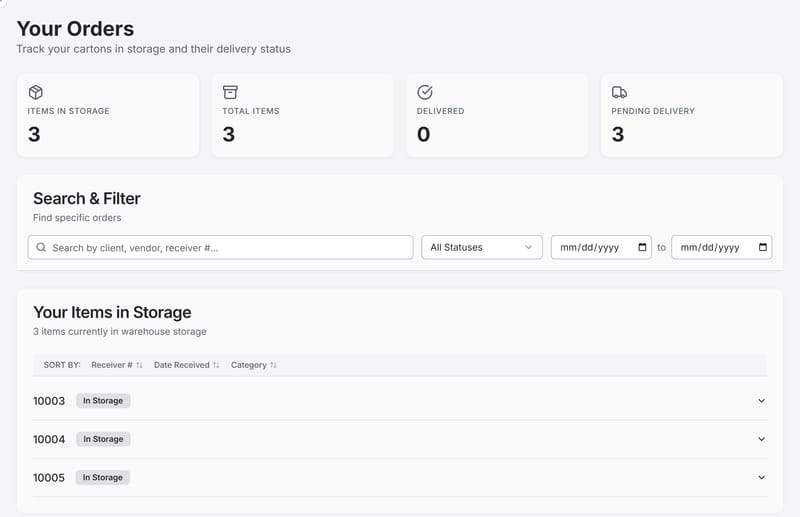
    Your customer logs in and sees their orders, status and the photos as soon as each carton is received. Damage gets an email from your own address.

    A customer's portal listing their orders in storage, with status.

Free plan, no card. No sales call.

Built around the receiving dock.

Photo every carton before it goes on the rack.

Photos are taken in the phone's browser and saved straight to the carton, and the activity log records who added them and when. Set a minimum number of photos per carton and your crew can't skip it. Record condition from your own list, add measurements and weight, and flag damage on the spot.

  • Minimum-photo rule per carton (0 to 20)
  • Your own condition list, for example "Good", "Damaged", "Needs minor repair"
  • Measurements and weight on each carton
  • Multi-carton pieces grouped as "carton 2 of 3"
More about dock photos →

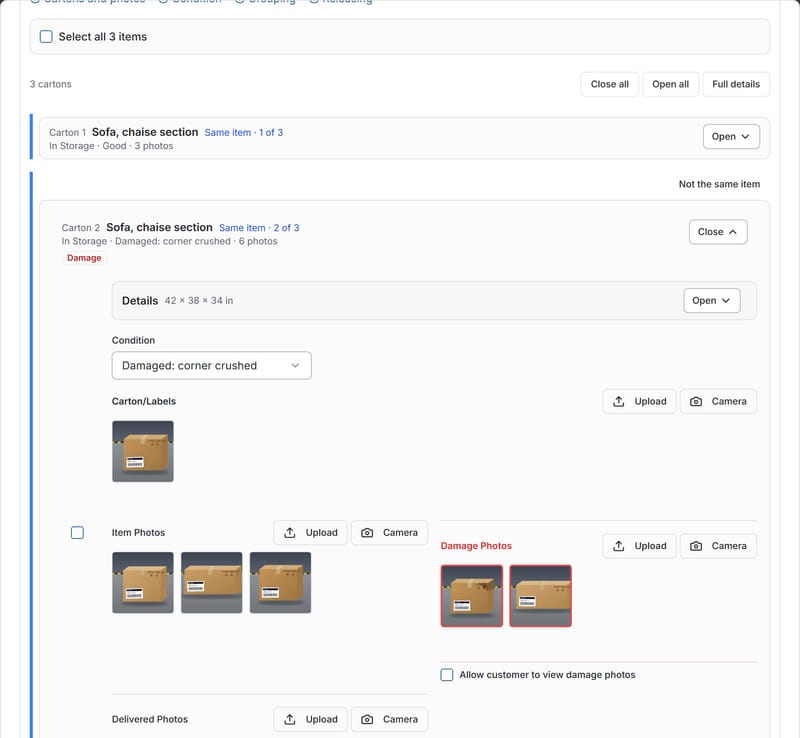
Order page showing carton 2 of 3 with a damage tag, its condition, item photos and separate damage photos.

Your customers check it themselves.

Every customer gets their own login and sees only their own orders. You decide which photos they see and when. Internal notes, billing and staff names stay on your side.

See the customer portal →

See what still needs doing, without walking the floor.

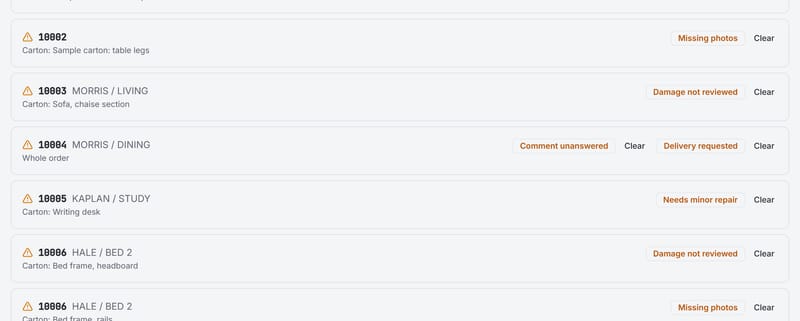
One list shows every open item: cartons missing photos, damage nobody has reviewed, repairs, customer comments waiting for a reply and delivery requests.

Clear an item and CartonLedger remembers who cleared it and when. If something new happens, like a new comment or a new damage photo, it comes back.

More about the queue →

Needs-attention list with unreviewed damage, an unanswered comment, a delivery request, a minor repair and missing photos.

Know who did what, and when.

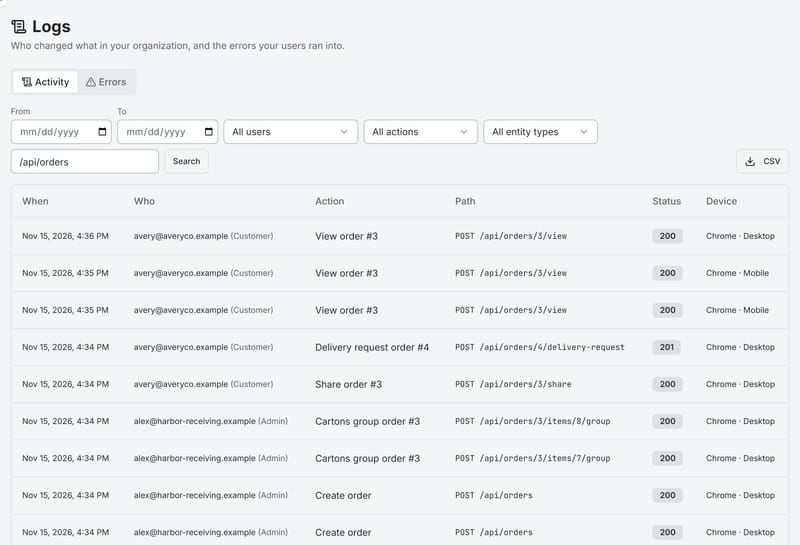
Every change is logged: received, photographed, released, delivered. When a customer asks "who signed for this?", you can answer in seconds. History is kept from 30 days to 2 years, depending on your plan.

Activity log listing who did what to each order, and when.
The customer's view of a carton: its condition, measurements and the item photos the warehouse took.

Give your customers a window, not a phone number.

Your customers want to know their goods arrived safely. With CartonLedger they log in and see it for themselves:

  • Their orders only: status, carton count and dates.
  • Photos as soon as a carton is received: or only after you have reviewed and released it, if you turn that on. You choose whether damage photos are always shown, never shown, or decided per item.
  • Comments and delivery requests: right on the order. Both land in your needs-attention list.
  • Shareable order links: for their client or installer, if you allow it.
  • Storage days: if you track them.

Portal logins are unlimited on every paid plan. Invite every customer you work with.

Every "did it arrive?" you don't have to answer is time back on the dock.

Invite your first customer on day one.

A phone showing a carton's condition and photos in CartonLedger.

Works on the phone your crew already carries.

There's nothing to install. CartonLedger runs in the phone's web browser, so the person unloading the truck can take the photos, mark condition and move on. The office sees it on a desktop the moment it's saved.

  • Uses the phone's camera, with no app-store download
  • Read-only logins for people who need to look, not change

There's no App Store app yet, and no scanning workflows (Pro has a basic barcode lookup). Photos and condition come first.

Set it up the way your dock already works.

No two receiving warehouses use the same words or the same paperwork. So you set CartonLedger to match yours.

Your words
Call them customers, clients or accounts; orders or jobs; cartons or pieces
Your fields
Show, hide or require vendor, carrier, PO, BOL/PRO, sidemark, received-by and notes
Your rules
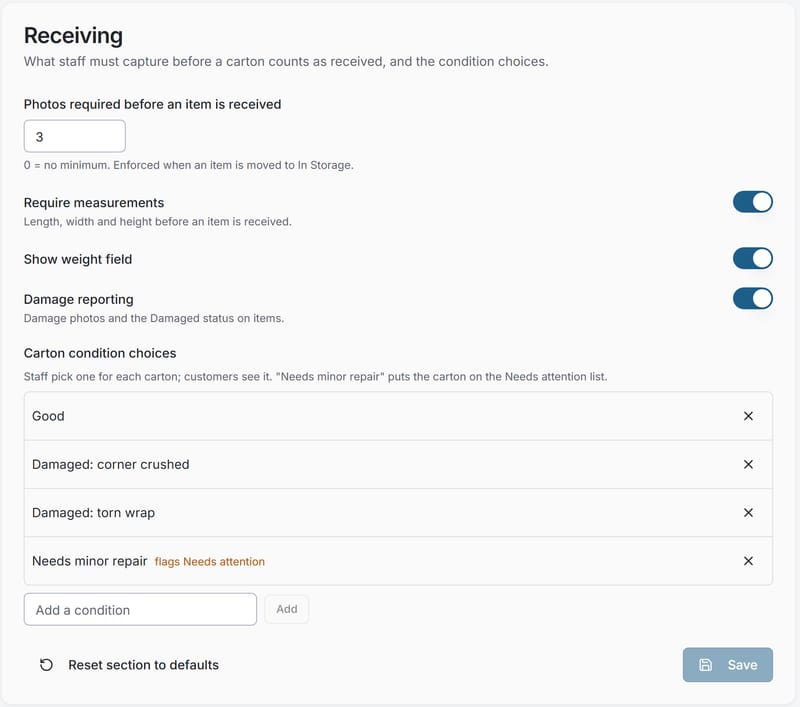
A minimum number of photos per carton; measurements required or not; damage reporting on or off
Your conditions
Your own list of condition choices
Your modules
Turn on deliveries, delivery photos and storage-deadline reminders when you need them
Your brand
Your logo and colour on the portal, and emails from your own address

Every email comes from you.

"Order received", "damage reported" and "delivered" emails go through your own mail server, so they carry your name and address. Your customers hear from you, not from a software company. If your mail server isn't set up yet, CartonLedger tells your staff instead of sending from someone else's address.

Receiving settings with a minimum number of photos per carton, required measurements and a custom condition list.

Your customers' information stays yours.

  • Kept apart by the database itself.

    Each warehouse's records are separated by rules inside the database, not just by our code. If that protection isn't active, CartonLedger refuses to start.

  • Tested before every release.

    We run 274 checks that try to read or change another warehouse's orders, photos, files, users and settings. All must fail before we ship.

  • Encrypted in transit.

    HTTPS only. Your mail-server password is encrypted again by us before it is stored.

  • Roles that match the job.

    Administrator, staff, read-only and customer. Customers see only their own orders.

Honest about what's next. Two-step sign-in, single sign-on and a security certification are on our roadmap, not claimed.

Read our security page →

One price per warehouse. Start free.

Billing period
  • Free

    For a small warehouse getting started

    $0 a month

    $0 a year

    No card, no time limit

    Staff seats
    2
    Orders a month
    25
    Photo storage
    2 GB
    Customer portal logins
    10
    Start free
  • Starter

    For a growing warehouse team

    $59 a month

    $590 a year

    or $590 a year (save 16.7%)

    or $59 billed monthly

    Staff seats
    5
    Orders a month
    250
    Photo storage
    25 GB
    Customer portal logins
    Unlimited
    Start free trialStart free trial
  • Pro

    For multi-crew, high-volume warehouses

    $349 a month

    $3,490 a year

    or $3,490 a year (save 16.7%)

    or $349 billed monthly

    Staff seats
    40
    Orders a month
    5,000
    Photo storage
    750 GB
    Customer portal logins
    Unlimited
    Start free trialStart free trial
  • Pay yearly and get two months free.
  • Extra staff seats are $10 a month. Extra storage is $10 a month per 50 GB. No setup fee.

Questions receivers ask us.

Do I need to install anything?

No. CartonLedger runs in the web browser on phones, tablets and computers. There's no App Store app yet.

Does it scan barcodes or print labels?

Only the basics, on Pro: printable carton labels and a page that looks a carton up by its barcode. CartonLedger is built around photos and condition first. If scanning-driven receiving is a must-have for you, we're not the right fit yet, and we'd like to hear about it.

What happens when the 14-day trial ends?

Your warehouse moves to the Free plan automatically. Nothing is locked: your orders stay readable. You only pay if you choose a paid plan.

Do I need a credit card to start?

No. You'll need a work email address. We send a link to confirm it before your warehouse is created.

How many customers can I invite?

Unlimited on Starter, Growth and Pro. Up to 10 on Free.

Can my customers see everything?

No. They see only their own orders and only the photos and files meant for them. Internal notes, billing details and staff names are never shown to them.

Who do the emails come from?

From you. Order emails go through your own mail server, set up in Settings > Email. Until it's set up, CartonLedger doesn't send them and tells your staff instead.

Can I bring in my existing inventory?

Not in bulk yet. Most warehouses start with new deliveries and let older stock run out of their current system.

Is my data kept separate from other warehouses?

Yes, by the database itself, and we test it before every release. Our security page explains how.

Can I get my data out?

Yes. A full export of your records and files is available on every plan, including Free. Routine exports at any time come with paid plans. After your account is closed, you have 30 days to ask for an export of your data, on any plan including Free, unless it was terminated for illegal activity.

Does it handle billing my customers for storage?

No. CartonLedger records what came in, its condition and its status. It doesn't invoice.

Is there a person I can talk to?

Yes. Email us at cartonledger@tullocktransport.com. We aim to give a first response within 2 business days on Starter and 1 business day on Growth. Pro gets priority email support and an onboarding call. These are targets, not guarantees.

Try it on your next delivery.

Set up your warehouse, photograph one real delivery and invite one customer. If it doesn't save you a phone call in the first week, you've lost nothing: the Free plan is yours to keep.

14 days of Growth · No card · Free plan after